
EDR and antivirus both protect business devices, but they operate at different depths: antivirus blocks known malware on a single device, while endpoint detection and response (EDR) monitors suspicious behavior across all your endpoints, isolates a compromised device, and traces how an attack started.
Most Malaysian businesses that hold customer data now need EDR-level protection rather than antivirus alone, because modern attacks routinely bypass signature-based tools. This guide explains the difference so you can decide what fits your business.
What is the difference between EDR and antivirus?
The difference between EDR and antivirus is what each one watches and how it responds. Antivirus scans files against a database of known threat signatures and quarantines anything that matches. EDR monitors the behavior of every endpoint continuously, records that activity, and lets a security team investigate and contain an incident when the initial block fails.
Antivirus answers one question: is this file known to be bad? EDR answers a broader one: is anything on this network behaving like an attack right now? This distinction matters because most serious breaches no longer rely on known malware. Attackers use stolen passwords, legitimate administration tools, and brand-new malware variants that no signature database recognizes yet. Signature-based antivirus misses these. EDR detects the behavior they produce, such as a finance laptop suddenly encrypting hundreds of files or a server connecting to an unfamiliar overseas address.
For a business that handles personal data under Malaysian law, that earlier detection decides whether an intrusion stays small or becomes a reportable breach.
How does traditional antivirus protect a business?
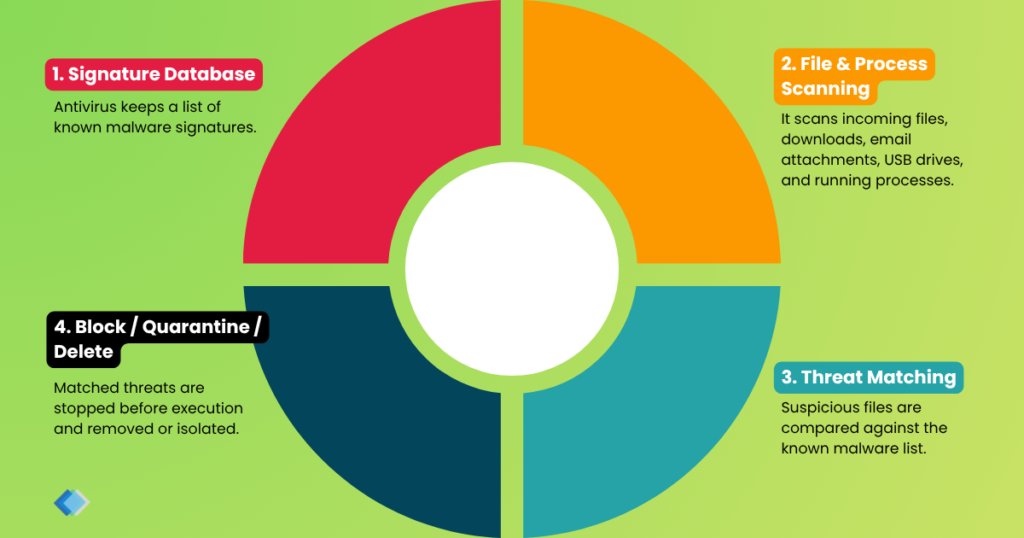
Traditional antivirus protects a business by blocking known malware before it executes. The software maintains a list of malware signatures, scans incoming files and running processes, and quarantines or deletes anything on the list. For a small office running standard software, antivirus stops the common threats that arrive through email attachments, downloads, and infected USB drives.
Antivirus performs three jobs well: it blocks widespread commodity malware, meets a baseline security requirement cheaply, and runs quietly on older machines with limited resources. Its limit is equally clear. Traditional antivirus depends on recognizing a threat in advance, so it cannot reliably stop a novel attack, a fileless attack that runs in memory, or an intruder using valid credentials. Next-generation antivirus adds machine-learning behavior analysis to catch some unknown threats, but it still focuses on prevention rather than the investigation and containment that EDR provides.
How does EDR protect a business?
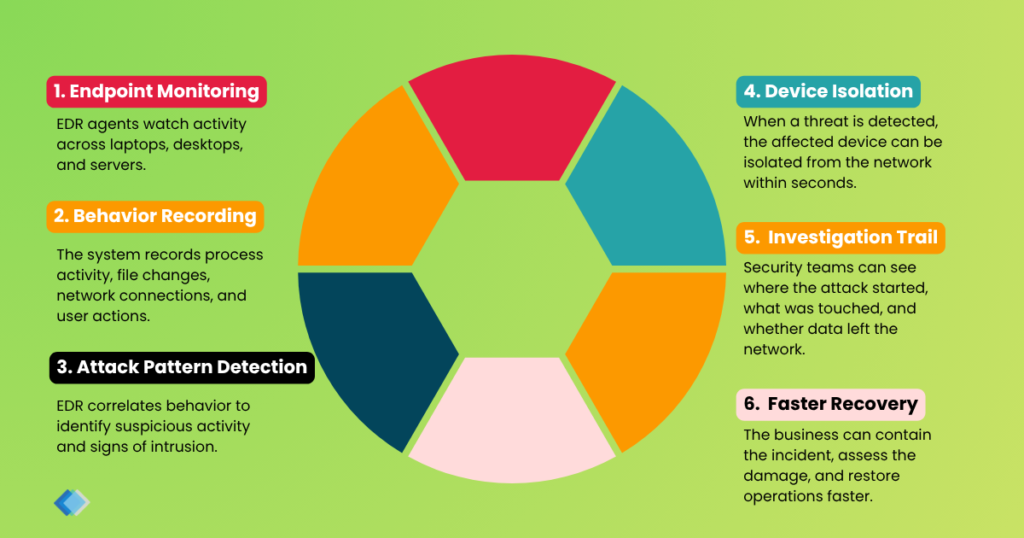
EDR protects a business by watching endpoint behavior, detecting attack patterns, and isolating threats that slip past the first line of defense. An EDR agent on each device records process activity, network connections, and file changes, then correlates that data to spot the signs of an intrusion. When EDR detects a threat, it isolates the affected device from the network within seconds, which stops ransomware from spreading to file servers and shared drives.
EDR also produces a clear record of what happened. After an incident, the team can see which device was hit first, what the attacker touched, and whether any data left the network. That visibility shortens recovery and supports the breach assessment that Malaysian data-protection rules now require. For businesses that process personal or financial data, this depth of response is the reason EDR sits at the center of most managed cybersecurity programs.
How do EDR and antivirus compare?
EDR and antivirus compare best across detection method, response, and visibility. The table below summarizes the practical differences for a business buyer.
| Capability | Antivirus | EDR |
|---|---|---|
| Detection method | Known malware signatures | Behavior and activity patterns |
| Stops novel and fileless attacks | Limited | Yes |
| Response to a threat | Quarantines the file | Isolates the device and contains the incident |
| Forensic record | Minimal | Full activity timeline per endpoint |
| Management | Often unmanaged or self-managed | Usually monitored by a security team or SOC |
| Best fit | Small, low-risk setups | Businesses holding customer or financial data |
Does your business need EDR, antivirus, or both?
Most businesses need EDR, and modern EDR already includes the antivirus function, so you rarely run two separate products. The right choice depends on the data you hold, the regulations you answer to, and the cost of downtime.
When is antivirus enough?
Antivirus is enough when a business holds little sensitive data and can tolerate downtime. A two-person studio with no customer database, no online payments, and no compliance obligations can run quality antivirus and accept the residual risk. The trade-off is real: if an attacker does get in, antivirus alone will not contain the spread or show what was taken.
When does a business need EDR?
A business needs EDR when it holds personal data, processes payments, or cannot afford extended downtime.
A clinic in Petaling Jaya, an accounting firm in Selangor, and a manufacturer in Johor all store data that the PDPA protects and that attackers target.
For these organizations, EDR within a managed cybersecurity service combines continuous monitoring with a team that responds when something is detected, which an unmanaged tool cannot do on its own. If you are weighing this decision, you can book a free consultation to map your current coverage against your risk.
How does EDR support PDPA compliance in Malaysia?
EDR supports PDPA compliance by helping a business apply reasonable security safeguards and respond to incidents within the legal timeline. The Personal Data Protection Act 2010 requires organizations that process personal data to protect it against loss, misuse, modification, and unauthorized access under its Security Principle. EDR contributes three things that principle expects: continuous monitoring of the devices that hold personal data, fast containment when a device is compromised, and an activity record that shows what an incident touched.
That record matters more since the Personal Data Protection (Amendment) Act 2024 took effect on 1 June 2025. Malaysian businesses must now notify the Personal Data Protection Commissioner of a qualifying breach as soon as practicable and no later than 72 hours after it occurs. When a business can show exactly which endpoint was affected and whether personal data left the network, it can assess the breach and meet that 72-hour deadline instead of guessing. Strong endpoint security also pairs with a tested backup and disaster recovery plan, so a business can both contain an attack and restore clean data afterward.
How do you roll out EDR without disrupting your team?
You roll out EDR without disruption by deploying it in stages and tuning it before it goes wide.
Start with an assessment of every device that connects to business data, including laptops, servers, and remote machines across your offices. Install the EDR agent on a small group first, confirm it does not interfere with daily software, then expand to the rest of the fleet. Finally, agree on who responds to alerts, whether that is your internal IT staff or an external security operations team.
Three practices keep the rollout smooth: schedule installation outside business hours, document an exception list for trusted line-of-business applications, and review the first two weeks of alerts to remove noise. Deployed this way, EDR strengthens protection without slowing the people who rely on their machines every day.
Which option fits your business?
Antivirus blocks known malware, but EDR contains a real attack and shows you what happened. For a Malaysian business that holds customer data, that difference decides whether an incident becomes a minor cleanup or a reportable breach with a 72-hour notification clock. Callnet Solution can assess your current endpoint protection, recommend the right level of coverage for your risk and budget, and manage it for you so threats are caught and contained around the clock.
Talk to our team about a managed approach that fits how your business actually works.