
A managed IT SLA defines what your provider commits to deliver, how fast the helpdesk responds, who handles escalation, and what happens when a target is missed. The service level agreement (SLA) is the part of a managed IT contract that converts marketing promises into measurable obligations, so a Malaysian business evaluating a provider should read it before the brochure.
Our checklist below walks through SLA scope, support hours, escalation and priority levels, onsite coverage, monitoring, security and backup responsibilities, and monthly reporting, with the specific questions to ask each provider. Most figures cited below vary by provider and plan tier, so treat them as benchmarks for comparison rather than fixed standards.
What is a managed IT SLA and why does it matter?
A managed IT SLA is the contractual section that defines service scope, response and resolution targets, priority levels, coverage hours, and the remedies that apply when the provider misses a target.
The SLA matters because it sets the only objective measure of accountability you can enforce after signing. Without measurable terms, a provider that quotes “fast support” and “best efforts” commits to nothing you can verify. Phrases such as “commercially reasonable efforts” and “subject to availability” signal a weak SLA, because they leave the provider room to define performance after the fact.
For a Malaysian SME without an in-house team, the SLA decides whether a server outage in Klang Valley gets a named engineer in 30 minutes or a callback the next afternoon. The next action is to request the full SLA document, not the sales summary, and compare its defined numbers against the sections below.
What response and resolution times should the SLA define?
The SLA should define both a response time and a resolution time, and it should state which one the provider guarantees.
Response time measures how long the provider takes to acknowledge a ticket and assign an engineer, and it sits entirely within the provider’s control, so most contracts commit to it as a firm target.
Resolution time measures how long the provider takes to close the issue, and providers usually express it as a target rather than a guarantee, because resolution depends on hardware part availability, third-party vendor outages, and how quickly the client approves emergency work.
A provider that states only a response time hides the figure that tells you how long a real fix takes.
Ask the provider to document response and resolution targets for every priority level, and confirm whether the clock runs on business hours or calendar hours, because a “4-hour” target means very different things under each. This level of accountability separates a true managed IT services contract from an ad-hoc break-fix arrangement.
How should escalation and priority levels work?
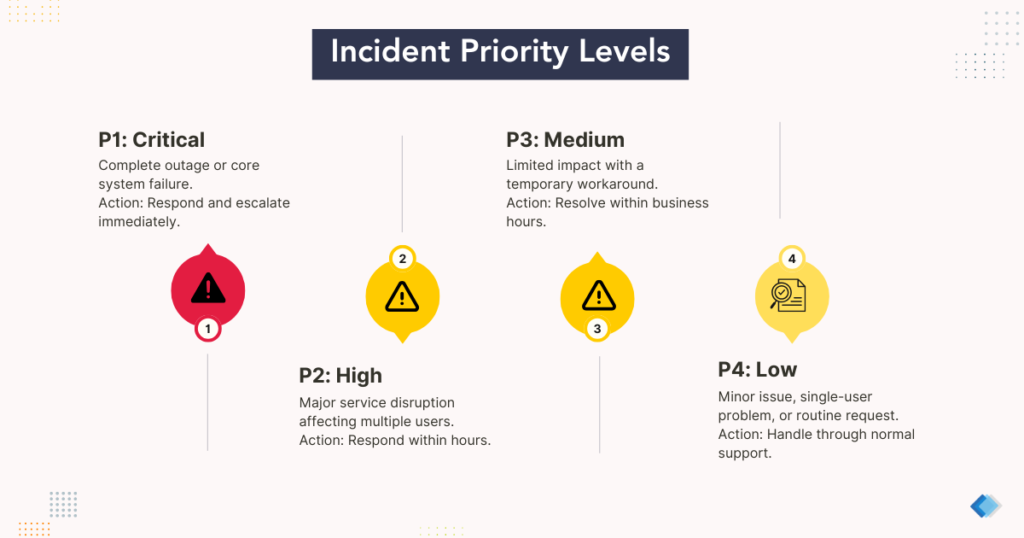
Escalation and priority levels should map every incident to a defined severity, then route it to the right people on a defined timeline. Priority comes from impact, meaning how many users or systems are affected, combined with urgency, meaning how time-sensitive the harm is. Most providers use a four-level scheme, and the targets vary by provider:
- Priority 1, critical: a full outage affecting all users or a core system such as the email server or the primary network link, with the fastest response target and immediate notification to a duty manager.
- Priority 2, high: major degradation affecting multiple users where a key service runs but is impaired, with a response target measured in hours.
- Priority 3, medium: limited impact affecting a small group where a workaround exists, with a response target measured in business hours.
- Priority 4, low: a minor or cosmetic issue affecting a single user, plus routine requests, with the longest response target.
Escalation then follows two paths that often run at once. Functional escalation transfers a ticket to an engineer with greater specialization or higher access rights, such as moving a firewall fault from a frontline agent to a network security engineer. Hierarchical escalation raises the incident to a manager or director when an SLA breach looms or the business impact demands a management decision.
Ask the provider for a written escalation matrix that names who gets contacted, at which priority, and within what timeframe, so accountability does not collapse during a Priority 1 incident.
What support hours and onsite coverage do you need?
The support hours you need depend on when your business actually operates and how much downtime your operations can absorb. Providers express coverage as hours by days, and three patterns dominate:
- 8×5: support runs eight hours a day, five days a week, typically aligned to standard business hours, with tickets logged after hours queued for the next working day.
- 24×5: support runs around the clock Monday through Friday, suitable for a business that runs weekday shifts but closes on weekends.
- 24×7: support runs every hour of every day including public holidays, which a continuous operation such as e-commerce, manufacturing, or healthcare requires.
A common trap is a provider that advertises 24×7 monitoring but staffs only 8×5 live response. Around-the-clock system monitoring means automated alerts fire at any hour, while live response means a human engineer acts on them, and these are separate commitments.
Confirm which one the 24×7 figure refers to. Onsite coverage is the second variable. Remote support resolves most tickets through secure remote access, and providers reserve onsite visits for hardware faults, cabling and rack work, or a security incident that needs a device physically isolated.
Many contracts include remote support in the monthly fee but bill onsite visits separately or cap onsite hours. Ask whether onsite support carries its own response target and which regions the provider covers, since a business in Johor or Penang needs different onsite logistics than one in Selangor or KL.
Who is responsible for monitoring, security, and backup?
Responsibility for monitoring, security, and backup should be split explicitly in the SLA, because shared-responsibility gaps cause most finger-pointing during an outage. The contract should name which party owns each task rather than assume the provider covers everything.
For monitoring, confirm that the provider runs continuous network monitoring on servers, links, and endpoints, and define what triggers an alert and an automatic ticket.
For security, the SLA should list the provider’s obligations, such as endpoint protection, patch management, and multi-factor authentication enforcement, and separate them from client obligations such as user access governance and physical security. A strong managed cybersecurity scope states who detects, contains, and remediates an incident, and at what hours.
For backup, do not assume the provider owns full recovery. Many contracts cover only backup-job monitoring, not recovery testing, so confirm the stated recovery point objective and recovery time objective and ask how often a restore test is run and documented. A complete backup and disaster recovery commitment defines the maximum acceptable data loss, the maximum time to restore, and the test cadence.
Map these duties against Malaysia’s Personal Data Protection Act 2010 (PDPA), which requires a business to apply reasonable security safeguards to the personal data it controls, because the legal duty stays with your business even when a provider operates the controls.
What uptime guarantee and service credits should the SLA include?
The SLA should state an uptime percentage for monitored infrastructure and define the service credits that apply when the provider misses it. Uptime is expressed as a percentage of a measurement period, and each added nine cuts allowable downtime roughly tenfold:
| Uptime target | Approximate downtime per month | Approximate downtime per year |
|---|---|---|
| 99% (two nines) | about 7.3 hours | about 87.6 hours |
| 99.9% (three nines) | about 43 minutes | about 8.8 hours |
| 99.99% (four nines) | about 4.4 minutes | about 52 minutes |
A higher target usually requires redundant links and failover systems, so ask what infrastructure supports the figure rather than accepting the percentage alone. Service credits are the standard remedy for a missed target, and they usually return a percentage of the monthly fee as a credit against the next invoice, scaled to how badly the target was missed. Check three conditions, because they limit the value of a credit. Credits are often claim-based rather than automatic, requiring you to file within a set window.
What reporting should a provider commit to?
A provider should commit to a regular reporting cadence that proves SLA performance rather than asserting it. The standard structure layers an operational report with a periodic strategic review.
A monthly operational report typically records ticket volume by priority and category, the SLA compliance rate showing the share of tickets resolved within target, patch management status, endpoint health, and uptime statistics for monitored systems.
A quarterly business review presents cost trends, risk posture, and roadmap recommendations to executive stakeholders. Reporting matters because it turns the SLA into something you can audit each month instead of a clause you only reread after a dispute. A provider that cannot produce a sample monthly report and describe its review cadence before signing has a visibility gap worth raising. If you run an internal IT team and want a provider to supplement it, ask how reporting works under a co-managed IT arrangement, where the SLA must state which party owns each service component so escalation and patching duties never fall between the two teams.
What should the SLA exclude, and what maintenance terms apply?
The SLA should state its exclusions and maintenance terms clearly, because what sits outside scope shapes your real coverage as much as what sits inside it. Expect providers to exclude major projects, new deployments, and migrations, which they usually scope and price separately. Expect exclusions for work outside the contracted coverage tier, issues caused by client-side changes made without the provider, third-party vendor outages, and hardware that has reached end of life. These exclusions are reasonable, but vague ones are not, so ask the provider to define each in writing. Maintenance windows deserve specific attention, because planned maintenance is legitimately excluded from uptime calculations only when the provider gives advance notice within the agreed period.
Confirm that the SLA sets the notice period, caps the maximum window length, and specifies permitted days and times, so routine patching does not quietly erode the uptime figure you are paying for. To pressure-test a draft SLA against your own operations, book a free consultation and walk through the exclusions line by line before you sign.
Questions to ask before signing
Use this checklist to compare providers on equal terms. Ask each provider to answer every question in writing.
- Response and resolution: What are the response and resolution targets for each priority level, and which ones are guaranteed rather than best-effort?
- Clock basis: Do the targets run on business hours or calendar hours, and when does the clock pause?
- Priority definitions: How does the SLA define each priority level by impact and urgency?
- Escalation: What is the written escalation matrix, naming who is contacted at each priority and within what timeframe?
- Coverage hours: Is support 8×5, 24×5, or 24×7, and does 24×7 mean live engineer response or automated alerting only?
- Onsite support: Is onsite included or billed separately, does it carry its own response target, and which regions are covered?
- Monitoring: What systems are monitored continuously, and what triggers an alert and an automatic ticket?
- Security responsibility: Which security tasks belong to the provider and which to your business?
- Backup and recovery: What are the stated recovery point objective and recovery time objective, and how often is a restore tested?
- Uptime and credits: What is the uptime target, how are service credits calculated, and are credits automatic or claim-based?
- Reporting: What does the monthly report contain, and how often is a business review held?
- Exclusions and maintenance: What is excluded from scope, and what notice and limits apply to maintenance windows?
- Compliance: How does the provider support your obligations under PDPA 2010 for the personal data you control?
How Callnet Solution can help?
Callnet works with businesses across the Klang Valley, Selangor, Kuala Lumpur, Johor, and Penang to set up managed IT services with clear, measurable service levels.
A good SLA should make accountability obvious before anything goes wrong, with defined response targets, named escalation paths, explicit security and backup ownership, and reporting you can audit each month. If you are reviewing a provider or drafting your own requirements, our team can talk through the questions in this checklist against your operations and recommend a service scope that fits how your business actually runs.
Book a free consultation when you are ready to compare your options.