AI adoption in Malaysia is accelerating, and more organizations are exploring how to integrate AI tools, automate operations, and build new digital capabilities. For many, however, the biggest question is where to begin. The truth is that AI performance depends heavily on the underlying compute infrastructure. Without the right processing power, memory bandwidth, and GPU acceleration, even the best AI models will run slowly or fail to scale.
This article explains what “AI-ready compute” means and how Malaysian businesses can choose the right mix of AI PCs, workstations, and GPU servers based on actual workload requirements. It also references modern infrastructure examples drawn from Dell Technologies and NVIDIA collaborations, including validated architectures featured in the Dell AI Factory framework, which outlines end-to-end design considerations for AI systems.
Our goal is simple: Help organizations understand their compute needs clearly so they can plan small, start effectively, and scale their AI initiatives with confidence.
What Makes Compute “AI-Ready”?
AI-ready compute refers to systems designed to process large volumes of data in parallel, accelerate mathematical operations used in machine learning, and support fast movement between CPU and GPU memory. Traditional business PCs and standard servers were built for sequential tasks. AI workloads, on the other hand, depend on highly parallelized hardware that can execute thousands of operations at once.
GPUs, tensor cores, and NPUs are central to this performance. They allow AI models to handle intensive operations such as matrix multiplication, vector computation, and large-scale pattern recognition.
For Malaysian organizations, being AI-ready also means ensuring compute is placed close to where data is generated. Data governance requirements, PDPA considerations, and low-latency needs often make local or hybrid compute setups more practical than relying on cloud GPUs alone. In simple terms, AI-ready compute is any system capable of running your AI workload reliably, efficiently, and in compliance with your operational environment.
CPUs vs GPUs: Which Does Your AI Workload Need?
CPUs remain essential for general-purpose logic, orchestration, preprocessing, and running the operational layers of AI applications. They handle tasks that require flexibility and branching logic. However, CPUs alone are insufficient for model training or large-scale inferencing because they are optimized for sequential computing rather than parallelized workloads.
GPUs are designed specifically for parallel processing. They execute thousands of mathematical operations simultaneously, making them ideal for neural networks, large transformer models, and deep learning tasks.
When choosing compute, the distinction is straightforward:
Use CPUs when:
- Processing small batches of data
- Running lightweight inferencing tasks
- Managing orchestration and application logic
- Handling general enterprise workloads
Use GPUs when:
- Training machine learning or deep learning models
- Processing large unstructured datasets
- Running generative AI workloads
- Performing image, text, or speech analysis
- Supporting multi-threaded AI pipelines
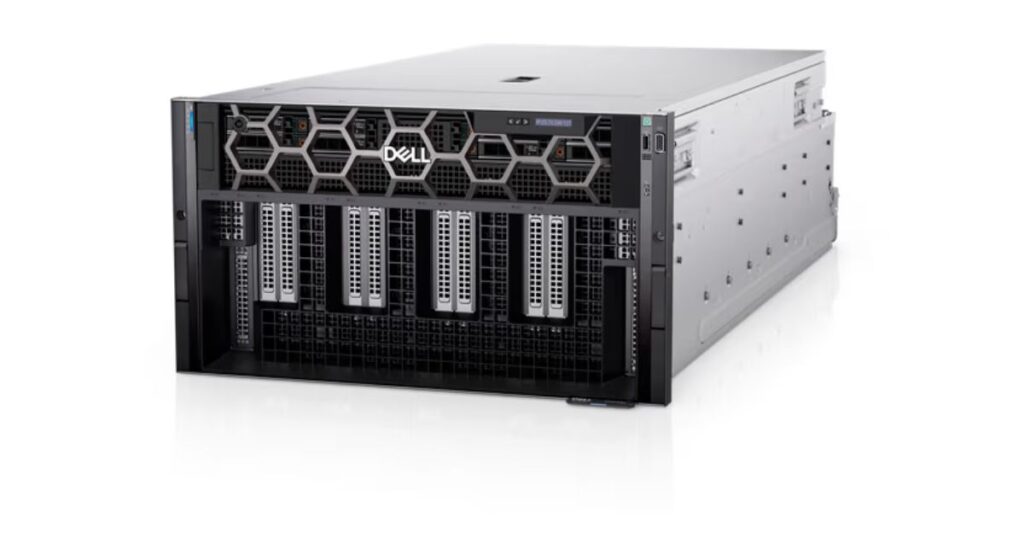
Different GPU configurations also match different stages of AI maturity. For example, Dell’s GPU-dense PowerEdge XE9680 server (shown in photo below) supports up to eight NVIDIA accelerators for training and high-throughput compute workloads, as highlighted in Dell’s AI Factory solution stack. Meanwhile, lighter inferencing and fine-tuning tasks can run on systems with fewer GPUs or even on AI-enabled workstations.
Understanding AI Workload Types
AI workloads are not all equal. Each type places different demands on compute, memory bandwidth, power, and GPU resources. In practice, Malaysian businesses typically work across three categories: inferencing, fine-tuning, and full model training.
1. Inferencing
Inferencing happens when a model is already trained and is simply used to produce outputs. Tasks include chatbots, text generation, image classification, summarization, and retrieval-augmented generation (RAG). Inferencing usually requires the least computational power. Many organizations run these workloads on AI PCs, NVIDIA-enabled workstations, or small GPU servers. Latency matters more than raw compute, and scaling is typically horizontal.
2. Fine-tuning
Fine-tuning adjusts an existing pretrained model to match domain-specific data. Examples include legal text adaptation, industry-specific customer service models, or localized language modifications. Fine-tuning requires more compute than inferencing because the model’s parameters need to be updated, but it is still significantly lighter than full training. Precision workstations equipped with high-end GPUs, or mid-range PowerEdge servers, can handle many fine-tuning tasks efficiently.
3. Training
Training builds a model from scratch or retrains a large model using massive datasets. This is the most compute-intensive AI workload. Training requires multi-GPU parallelism, rapid access to data, high network throughput between GPUs, and substantial power capacity.
Understanding these workload categories helps businesses match their compute strategy to their true needs. Most Malaysian organizations start with inferencing or fine-tuning before progressing to full-scale training.
Choosing the Right Compute Platform for AI Workloads

Not every AI initiative requires high-end GPU servers. The right compute platform depends entirely on the workload’s complexity, data volume, and how quickly results need to be processed. For most Malaysian organizations, AI adoption progresses in phases: starting with AI PCs, moving to workstations for heavier experimentation, and eventually scaling to GPU servers when workloads demand it.
The following framework helps teams understand where they fit today and what they may need as they grow.
Tier-1: Light Workloads
These workloads involve productivity enhancements or simple automation. Examples include summarizing documents, generating marketing copy, running chatbots, transcribing meetings, or light image classification. AI PCs and workstations equipped with NPUs or discrete GPUs handle these efficiently because they can run inferencing tasks locally with low power and strong responsiveness.
For small teams or early-stage pilots, this tier offers the best balance of cost, simplicity, and capability.
Best fit:
- AI PCs
- Precision-class workstations
- Single-GPU small servers
Tier-2: Medium Workloads
Medium-intensity workloads require more GPU power, longer processing times, and greater memory bandwidth. Malaysian examples include retail vision analytics, OCR pipelines for logistics, customer interaction scoring, or legal document summarization at scale. These tasks benefit from systems that can run continuous or parallelized workloads without bottlenecks.
Multi-GPU workstations or mid-tier GPU servers (with one to four GPUs) provide enough headroom for fine-tuning and high-volume inferencing.
Best fit:
- Multi-GPU workstations
- 1–4 GPU PowerEdge-class servers
- On-prem or hybrid inferencing clusters
Tier-3: Heavy Workloads
This is where full model training, engineering simulations, and advanced vision workloads sit. These tasks require multi-GPU parallelism, high interconnect bandwidth, and sustained power delivery. GPU-dense servers, such as top-tier models capable of housing up to eight accelerators, are built for these high-end scenarios. Organizations typically move into this tier only when operating at enterprise scale or building highly customized AI solutions.
Best fit:
- High-density GPU servers (up to 8 GPUs per node)
- Multi-node GPU clusters
- Liquid-cooled configurations for sustained training
Putting it together
| Compute Tier | Workload Type | Best-Fit Platforms | Why This Tier Works |
|---|---|---|---|
| Tier 1: Light Workloads | Low-intensity AI; basic inferencing | AI PCs, Precision Workstations, Single-GPU small servers | Fast local inferencing, low cost, strong privacy, ideal for early pilots and small teams |
| Tier 2: Medium Workloads | Continuous or parallel tasks; moderate GPU needs | Multi-GPU workstations, 1–4 GPU servers, on-prem or hybrid inferencing clusters | Handles higher data volume and concurrency without overbuilding infrastructure |
| Tier 3: Heavy Workloads | High-intensity AI; large model training | GPU-dense servers (up to 8 GPUs), multi-node GPU clusters, liquid-cooled systems | Designed for sustained parallel training, high throughput, and enterprise-scale AI |
Choosing between an AI PC, workstation, or GPU server is ultimately a matter of matching the compute tier to the workload. Many Malaysian organizations do not need heavy AI infrastructure on day one. Starting small and upgrading over time helps control cost while ensuring that compute resources scale naturally with business requirements. When aligned with the right form factor, AI workloads run faster, more reliably, and far more cost-effectively.
Cloud vs On-Prem vs Hybrid Compute for AI
Once an organization understands which compute tier its AI workloads fall into, the next decision is where those workloads should run. The choice between cloud, on-prem, and hybrid deployment shapes cost, performance, governance, and long-term scalability. Rather than being a technical preference, it is a strategic decision tied closely to workload behavior and the organization’s operating environment.
Cloud Compute: Flexible for experimentation and short-term bursts
Cloud GPUs work well for teams that are experimenting, building proofs of concept, or running AI workloads on an irregular basis. Cloud platforms offer fast provisioning and allow organizations to rent high-performance GPUs without upfront hardware investment. This makes them ideal for early-stage inferencing, exploratory fine-tuning, or high-intensity workloads that run only occasionally.
However, cloud GPU costs can increase quickly with continuous workloads, large datasets that need frequent uploading, or long-running training cycles. Data residency concerns may also limit the suitability of cloud for regulated industries.
On-Prem Compute: Best for consistent, high-volume, or sensitive workloads
On-premise GPU servers deliver predictable performance and help organizations avoid recurring cloud rental fees. They are typically the best fit for workloads that run every day, handle sensitive or proprietary datasets, or require strict control over latency and data governance. Many Malaysian enterprises choose on-prem deployments for this reason, especially when models process customer records, financial documents, or operational data that cannot leave the country.
On-prem systems also become more cost-effective over time for sustained training or high-throughput inferencing because the hardware can be fully utilized without ongoing hourly charges.
Hybrid Compute: The most practical model for Malaysian teams
Hybrid environments combine local infrastructure with cloud flexibility. Teams often run sensitive or continuous workloads on-prem while pushing overflow or short-term workloads to the cloud when extra capacity is needed. This model works well for large data volumes, unpredictable traffic patterns, or AI initiatives that evolve over time.
Hybrid compute, as we mentioned in our other article, also supports a natural scaling path. Organizations can begin with a small on-prem GPU setup, rely on cloud for peak processing, and expand local infrastructure later as workloads mature and become more predictable.
Choosing the right model
Cloud is ideal for starting small. On-prem becomes essential as workloads grow. Hybrid strikes a balance between agility and control. By aligning compute placement with data sensitivity, workload behavior, and long-term cost, organizations can build a sustainable AI environment that scales in step with their business.
How to Right-Size Compute for Malaysian AI Use Cases
Right-sizing compute is ultimately about creating a practical, sustainable path to AI adoption. This means choosing infrastructure that matches the workload today, while leaving room for controlled expansion tomorrow. To avoid both underpowered systems and unnecessary spending, organizations can follow a simple, structured approach that also acts as their roadmap toward becoming AI-ready.

Many businesses want to adopt AI, but the real challenge is knowing where to start and how to scale responsibly. The right compute strategy does not have to be complex. It starts with understanding your workload, choosing the right entry point, and growing your infrastructure in phases.
If your team is exploring AI or wants to validate the next step in your roadmap, our consultants are always happy to share insights and help you plan a practical, future-ready approach.
Chong YC
CallNet Solution Mangaing Director
1. Start with a clear AI use case
Right-sizing begins with understanding the problem you are solving. A chatbot, vision analytics system, or custom model training platform each requires very different compute profiles. Before choosing hardware, teams should document expected inputs, outputs, user groups, and required response times.
2. Estimate data volume and model size
Text workloads, image workloads, and video workloads behave very differently. Knowing how much data you will process, how fast it arrives, and how often models need to be updated determines whether an AI PC, a workstation, or a multi-GPU server is the right entry point.
3. Match the compute tier to the workload
Using the earlier light–medium–heavy framework keeps sizing decisions grounded and predictable.
- Light workloads: AI PCs or workstations.
- Medium workloads: Multi-GPU workstations or 1–4 GPU servers.
- Heavy workloads: GPU-dense servers or multi-node clusters.
This avoids premature investment in high-end systems while ensuring performance is not compromised.
4. Consider concurrency and real-time needs
If multiple users depend on the model simultaneously, or if inferencing must happen in real time, workloads may need additional GPU capacity. Response latency and throughput requirements often influence whether compute remains local, moves to the cloud, or sits in a hybrid configuration.
5. Run a pilot to validate assumptions
Before making major investments, a small pilot environment can validate performance, test data flows, and expose bottlenecks. Pilots are particularly valuable for Malaysian teams with evolving skill sets, as they reduce risk and support gradual upskilling.
6. Plan for total cost of ownership
Electricity consumption, cooling, cloud GPU rental fees, data transfer costs, and lifecycle planning all affect long-term affordability. Right-sizing means selecting the compute option that provides the best balance between performance and operational cost over time.
7. Scale in Deliberate phases
In most cases, we do not recommend jumping straight into GPU clusters. Instead, a phased approach allows infrastructure to grow alongside the use case. As workloads become more advanced, you can then expand from AI PCs to workstations, then to mid-tier GPU servers, and finally into high-density compute when the demand justifies it.
This phased model helps teams adopt AI responsibly, budget effectively, and avoid unnecessary complexity.
Conclusion
Choosing the right compute foundation is one of the most important steps in any AI initiative. You do not need to start with large GPU clusters. In most cases, progress begins with lightweight inferencing on AI PCs or workstations, then gradually scales into more powerful server-based environments as workloads mature and data volumes grow. By understanding the demands of different AI workloads and right-sizing compute resources carefully, Malaysian businesses can adopt AI in a way that is practical, cost-effective, and aligned with local data governance requirements.
A thoughtful, phased approach allows teams to experiment safely, build internal expertise, and expand only when the return is clear. With the right compute strategy in place, organizations can unlock the full potential of AI while maintaining performance, compliance, and long-term financial sustainability.