
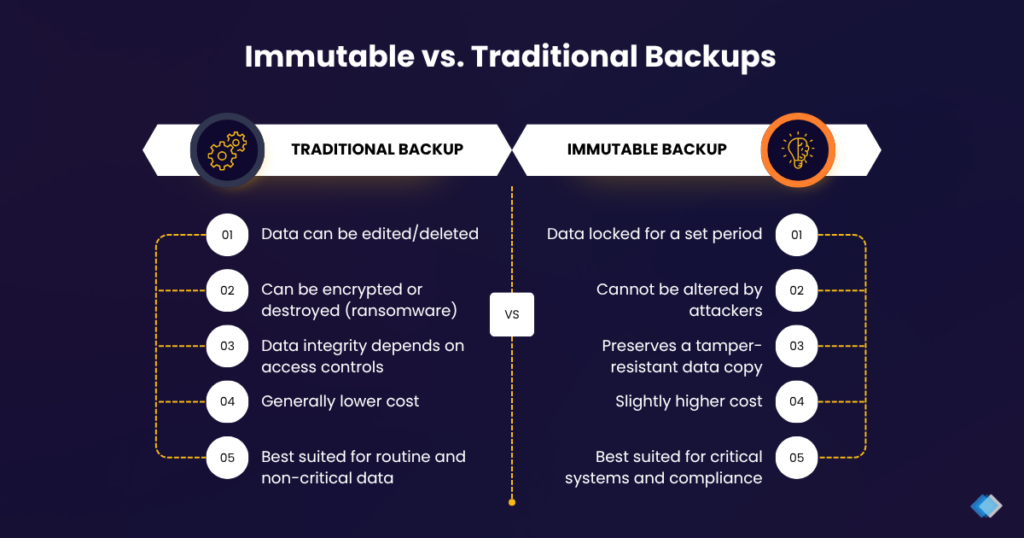
An immutable backup is a backup copy that cannot be changed, encrypted, or deleted for a fixed period after it is written, even by an administrator. Immutable backup uses a write-once-read-many (WORM) model, so the data locks in place the moment it lands in the repository and stays readable but unwritable until the lock expires.
An immutable backup matters because modern ransomware hunts for backups and deletes them before it encrypts production systems, and a backup that cannot be deleted removes the attacker’s leverage. For a Malaysian business weighing its recovery options, immutability is the difference between restoring in hours and paying a ransom with no guarantee of getting the data back.
What is an immutable backup?
An immutable backup is a stored copy that no one can modify or erase during a defined immutability period, regardless of their access level. The immutability comes from a WORM control at the storage layer, such as object lock in cloud object storage or a hardened repository on premises, which rejects any delete or overwrite request until the lock expires. This design closes the gap that ordinary backups leave open, because an attacker or a rogue insider with admin credentials still cannot rewrite a locked copy.
Why do ransomware attacks target backups first?
Ransomware attacks target backups first because a recoverable backup destroys the ransom business model. If a company can restore its own data, it has no reason to pay, so attackers locate the backup server, delete or encrypt the stored copies, then trigger encryption on production systems.
Several documented ransomware families, including Conti, LockBit, and BlackCat, search for backup software and connected storage as an early step in the intrusion. This sequencing means a business that relies on a single connected backup often discovers the backup is gone at the exact moment it needs to restore. Immutable storage and layered managed security break that sequence, because the locked copy stays intact even after the attacker gains domain admin rights.
How is immutable backup different from ordinary cloud backup?
Immutable backup differs from ordinary cloud backup because the stored copy is locked against deletion, while an ordinary cloud backup remains editable by anyone who holds the right credentials. An ordinary cloud backup copies data offsite and encrypts it in transit and at rest, which protects against hardware failure and site loss, but the copy can still be deleted through the backup console or a compromised account. Immutable backup adds a WORM lock on top of that offsite copy, so a delete request fails until the immutability period ends. The table below sets out the practical difference for a ransomware scenario.
| Attribute | Ordinary cloud backup | Immutable backup |
|---|---|---|
| Storage location | Offsite in the cloud | Offsite in the cloud |
| Encryption | In transit and at rest | In transit and at rest |
| Deletion by an admin | Possible | Blocked until the lock expires |
| Deletion by a compromised account | Possible | Blocked until the lock expires |
| Survives a targeted ransomware attack | Not guaranteed | Yes, for the locked period |
The interpretation is direct: encryption protects confidentiality, but only immutability protects the backup from deletion during an active attack. A resilient backup and disaster recovery design pairs both rather than treating them as interchangeable.
How does an immutability period work?
An immutability period sets the number of days a backup stays locked and unwritable from the moment it is written to the repository. During that window, the storage layer denies every delete and overwrite request, so an attacker who compromises the environment on day three still cannot remove a copy that carries a fourteen-day lock.
Cloud platforms enforce this at the object level. Amazon S3 Object Lock in compliance mode blocks deletion by every identity, including the AWS account root user, until the retention date passes, and Microsoft Azure enforces the same principle through blob versioning with version-level immutability.
On-premises hardened repositories apply a comparable lock at the file system. The immutability period needs sizing against the retention policy, because too short a lock leaves recent copies exposed and too long a lock raises storage cost and restore-point count.
How long should the immutability period be?
The immutability period should cover the time a business realistically needs to detect an attack and start a clean restore, which usually means at least the length of the backup retention cycle. Attackers often sit inside a network for days or weeks before triggering encryption, so a lock shorter than the dwell time can expire before the incident surfaces.
A common approach ties the immutability period to the retention schedule, for example locking daily copies for the same span the business keeps them. The right figure varies by data-change rate, storage budget, and compliance obligation, so validate it against your own recovery-time targets rather than copying a default.
How does immutable backup support ransomware recovery and DR?
Immutable backup supports ransomware recovery and disaster recovery by guaranteeing a clean, tamper-proof restore point when every connected copy has been compromised. Recovery from ransomware depends on having data the attacker could not reach, and an immutable copy provides exactly that, which is why immutability now sits inside the 3-2-1-1-0 backup rule.
The 3-2-1-1-0 rule keeps three copies of data on two media types with one copy offsite, adds one copy that is immutable or air-gapped, and verifies zero recovery errors through restore validation. Air gap and immutability both isolate a copy, but they differ in method: an air gap physically or logically disconnects the copy from the network, while immutability keeps the copy online yet locked against deletion.
The restore-validation step matters as much as the lock, because a backup that never restores cleanly is a false sense of safety. A tested backup and disaster recovery plan runs periodic recovery drills, confirms the immutable copy boots and mounts, and measures the actual recovery time against the target RTO. For a business that also handles personal data, immutable backups reinforce the reasonable-security-safeguards duty under Malaysia’s Personal Data Protection Act 2010 (PDPA), because a recoverable, tamper-proof copy limits the damage and the reporting fallout from a ransomware breach. Platforms such as Veeam implement immutability across cloud object storage and hardened repositories, and the same architecture principle applies whichever product enforces the lock.
Does your business need immutable backup?
Your business needs immutable backup if it cannot afford to lose its data to ransomware and cannot rely on paying a ransom to get it back, which describes almost every organization that stores customer records, financial data, or operational systems. The case is strongest for businesses that hold regulated personal data under the PDPA, run systems that must recover within a tight RTO, or lack an in-house team to defend the backup infrastructure around the clock.
Immutability is not a single product to buy but an architecture principle to apply, so the practical questions are which copies to lock, for how long, and how often to test the restore. A managed IT services provider can assess your current backups, add an immutable tier, and prove recovery through scheduled drills.
How Callnet Solution can help
Callnet Solution designs backup and recovery around the reality that ransomware attacks the backups first. Our team assesses your existing copies, adds an immutable tier with a sensibly sized immutability period, and runs restore drills so you know the data comes back clean and inside your recovery-time target. We serve businesses across the Klang Valley, Selangor, Kuala Lumpur, and wider West Malaysia, including clients in Johor and Penang, and we align every recovery plan with PDPA obligations.
Book a free consultation to review your current backup design and close the gaps a ransomware attacker would exploit.