
AI readiness is the state in which a Malaysian SME can deploy AI tools safely, because its data, identity, cloud, and security foundations already support them. Most businesses ask whether they are ready for AI after seeing a Microsoft 365 Copilot demo, but readiness is an IT foundation question, not a feature question. An AI tool reads the data your staff can already access, inherits the permissions you already set, and exposes any weakness in your setup.
The honest test is whether your infrastructure can let an AI tool act on company data without leaking it, breaking a control, or breaching the Personal Data Protection Act 2010 (PDPA). This guide covers the foundations that decide that answer: data, Microsoft 365 readiness, identity, secure cloud, governance, and user adoption.
What does AI readiness mean for an SME?
AI readiness for an SME means the business has the data, access controls, cloud platform, and governance in place to run an AI tool on real company information without creating a security or compliance risk. The definition centers on infrastructure because modern business AI now grounds its answers in your own files, email, and chat history rather than public knowledge alone.
An AI assistant that summarizes a quotation or drafts a reply pulls from SharePoint, OneDrive, and Exchange, so its output is only as controlled as those systems. For a business weighing its first AI rollout, this reframes the project from buying licenses to preparing the platform.
A useful first step is naming one concrete use case rather than adopting AI broadly. Three common and realistic SME use cases are drafting customer email replies, summarizing supplier contracts, and answering staff questions from internal policy documents. Each touches a different data source, so each exposes a different readiness gap.
Is your Business data ready for AI?
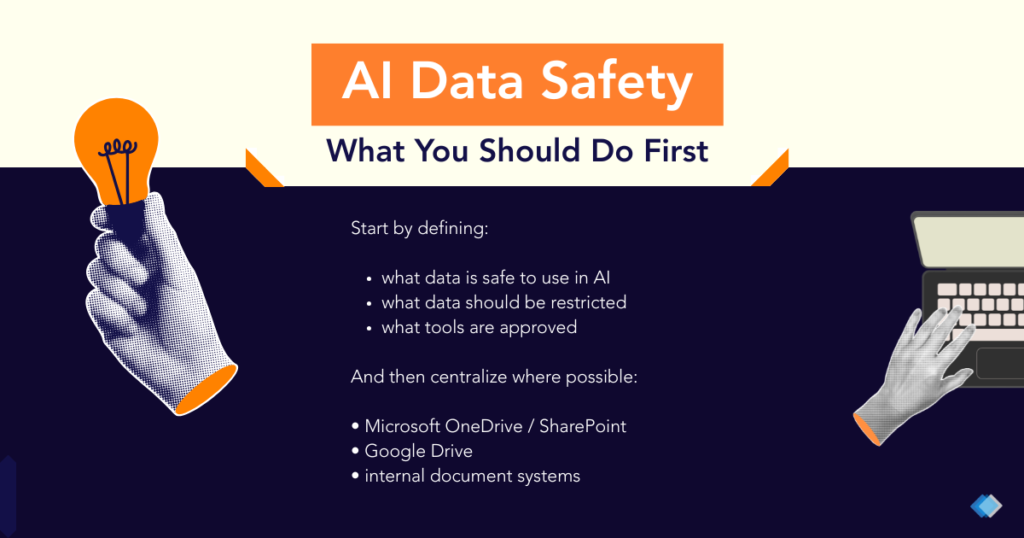
Your data is ready for AI when it is accessible to the right people, accurate, and free of oversharing, because an AI tool surfaces exactly what its user can already reach.
AI readiness depends on data readiness more than on any single AI product, because an AI assistant retrieves and recombines existing files, so duplicate folders, outdated documents, and wrongly shared sites all flow straight into its answers. Two failure modes matter most. Oversharing lets a SharePoint site marked “everyone in the organization” reveal salary files or board minutes to a junior user. Stale data lets the AI tool quote a price list or a policy the business retired two years ago.
Data quality and access control therefore decide whether AI output is trustworthy. A business preparing for AI should audit who can open each sensitive site, archive obsolete files, and label confidential documents first. This data hygiene work overlaps directly with data protection and is the most decisive part of an AI project.
Why does Microsoft 365 readiness decide Copilot success?
Microsoft 365 readiness decides Copilot success because Microsoft 365 Copilot runs inside your tenant and obeys your existing Microsoft 365 permissions, identity, and data setup. Copilot is an add-on license that requires a qualifying base plan such as Microsoft 365 Business Standard, Business Premium, or an enterprise plan, according to Microsoft Learn licensing documentation updated in 2026. An SME cannot buy Copilot in isolation*; it layers onto an existing Microsoft 365 environment. Microsoft also lists hard technical requirements: every user needs a Microsoft Entra ID account, and the primary mailbox must sit in Exchange Online.
Beyond those requirements, Microsoft strongly recommends data and compliance readiness before rollout. Microsoft’s Copilot data and compliance readiness guidance recommends reducing SharePoint oversharing, applying Microsoft Purview sensitivity labels, and piloting Copilot with a small group first. Copilot only surfaces files a user already has permission to open, so a clean permission model is the precondition for safe answers. A tenant with tidy permissions and labeled data produces accurate, contained results, while a tenant with open sites produces an AI tool that confidently exposes data it should never have shown.
* Commercial policies change from time to time, please check with our team for latest details.
How do identity and permissions affect AI rollout?
Identity and permissions affect AI rollout directly, because an AI tool acts with the access rights of the user who runs it. AI tools enforce, rather than replace, your existing access model. If a sales executive can open the finance folder today, an AI assistant run by that executive can read and summarize the finance folder too. Three identity controls matter most. Multi-factor authentication verifies a second factor and blocks an attacker who steals a password from reaching AI-connected data. Least-privilege access limits each account to the files its role needs, which shrinks what any AI query can expose. Conditional access restricts sign-in by device, location, or risk level, so an unmanaged laptop cannot pull company data through an AI tool.
Tightening identity is therefore part of preparing for AI, not a separate project. A growing SME in Johor or across West Malaysia often finds that access crept wider as staff changed roles, and AI readiness forces a useful cleanup. This work sits within cybersecurity and protects the business whether or not AI arrives.
What cloud and security foundations does AI need?
AI needs a secure, well-governed cloud foundation, because AI tools process company data in cloud services and inherit the protection level of the platform they run on. AI workloads move data between storage, identity, and the AI model, so each link must be encrypted, monitored, and access-controlled. An SME on a patchy mix of personal drives and unmanaged accounts cannot safely add AI on top. Readiness requires a consolidated, monitored cloud platform, and three foundations carry the most weight.
- Centralized cloud storage: Centralized cloud storage keeps company files in governed SharePoint and OneDrive locations rather than scattered personal devices, so an AI tool reads from controlled sources.
- Continuous monitoring: Continuous monitoring watches sign-ins and data access for anomalies, so unusual AI-driven data pulls or compromised accounts trigger an alert.
- Backup and recovery: Backup and recovery retains encrypted copies of company data, so an accidental deletion or a ransomware event during an AI project does not become permanent data loss.
Consolidating onto a governed platform is usually the largest piece of AI readiness work for an SME, and it pairs naturally with cloud solutions and a planned migration. The same foundation that makes AI safe also reduces downtime and strengthens the SME’s security posture.
How do you govern AI use safely?
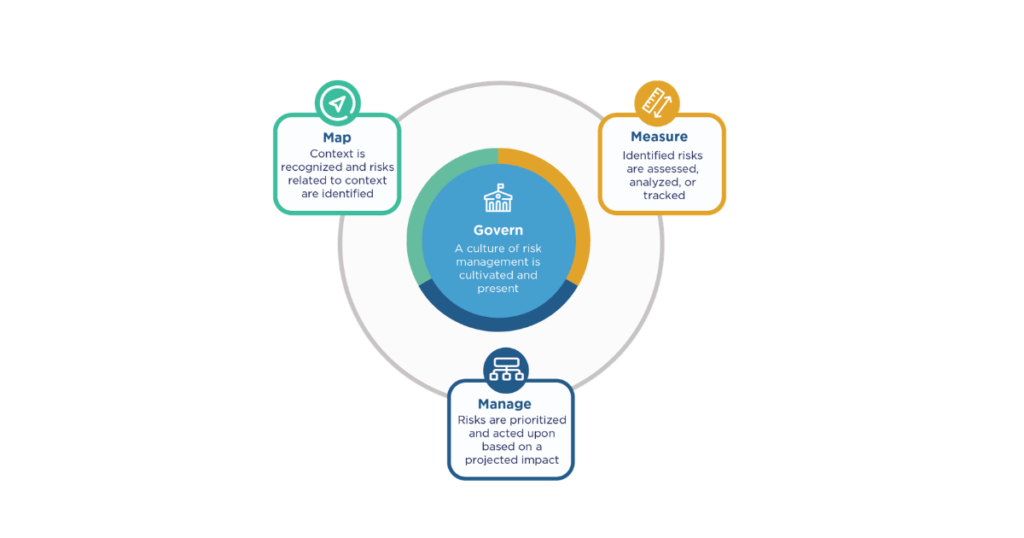
You govern AI use safely by setting clear rules for what data AI tools may touch, who may use them, and how their use is reviewed. AI governance is the set of policies and controls that keep AI use accountable, lawful, and aligned with business goals.
Two international frameworks guide this work:
- The NIST AI Risk Management Framework, published by the US National Institute of Standards and Technology in January 2023, organizes governance around four functions: govern, map, measure, and manage.
- ISO/IEC 42001, published in December 2023, defines a certifiable AI management system covering risk assessment, data governance, and transparency.
Malaysian law shapes governance further. The Personal Data Protection (Amendment) Act 2024 brought its main obligations into force on 1 June 2025, introducing mandatory data breach notification to the Commissioner within 72 hours and mandatory appointment of a Data Protection Officer for large-scale processing, according to guidelines issued by the Department of Personal Data Protection.
Because AI tools process personal data, these PDPA duties apply to AI use directly. Malaysia has also issued the voluntary National Guidelines on AI Governance and Ethics through the Ministry of Science, Technology and Innovation on 20 September 2024 and established the National AI Office in December 2024. An SME does not need ISO 42001 certification to start, but it should write a short AI use policy, restrict AI access to approved data, and assign someone to review AI use against PDPA obligations.
How do you prepare your people for AI?
You prepare your people for AI through training, clear policy, and a phased rollout. People matter as much as infrastructure because staff decide which data they feed an AI tool and whether they trust its output. An untrained team either avoids the tool, wasting the license, or over-trusts it, pasting confidential data into the wrong place.
Three practices prepare a workforce. First, role-based training shows each team realistic use cases, such as a sales team summarizing email threads or an admin team drafting standard documents. Second, a plain AI use policy tells staff which data is approved, which is off-limits, and that AI output needs human review before it reaches a customer. Third, a phased rollout starts with a pilot group, gathers feedback, and expands once the workflow and the controls are proven.
A trained, governed team treats AI as a controlled tool, while an unprepared team turns the same tool into a data risk.
Callnet Solution can help!
AI readiness is an IT foundation an SME builds before it deploys any AI tool, spanning data hygiene, Microsoft 365 setup, identity controls, secure cloud, governance, and staff training. A business that prepares these foundations runs AI that is accurate, contained, and compliant with the PDPA, while a business that skips them runs an AI tool that amplifies every existing weakness. The practical path is to pick one use case, audit your data and permissions, consolidate onto a secure cloud platform, and write a short AI use policy before buying licenses at scale.
Callnet Solution works with Malaysian SMEs across the Klang Valley, Selangor, Kuala Lumpur, Johor, and Penang to assess AI readiness and prepare the underlying IT, cloud, and security foundations. To find out whether your business is ready to adopt AI safely, book a free consultation and request an AI readiness assessment for your setup.